Overview
This section documents how B2B Plus links Shopify warehouses (locations) to B2B companies, so orders, inventory, and purchase orders are routed to the right fulfillment location for each company.
In this guide:
- What is Warehouse ↔ Company Mapping?
- Why Warehouse ↔ Company Mapping is needed
- Which modules use Warehouse ↔ Company Mapping?
What is Warehouse ↔ Company Mapping?
Warehouse ↔ Company Mapping links a specific Shopify warehouse (location) to one or more B2B companies (or company locations), so B2B Plus knows which physical warehouse should fulfill which company's orders by default, rather than requiring staff to pick a warehouse manually on every order, inventory record, or purchase order.
Key features this relationship enables:
- Default fulfillment routing — orders and fulfillments for a mapped company can default to the correct warehouse automatically.
- Consistent warehouse assignment — the same mapping underlies the Warehouse field on Inventory records, the destination location on Purchase Orders, and the fulfillment location shown on Orders.
- Scoped availability — inventory and overselling behavior are evaluated per warehouse, so mapping a company to the correct warehouse keeps availability checks accurate for that company's buyers.
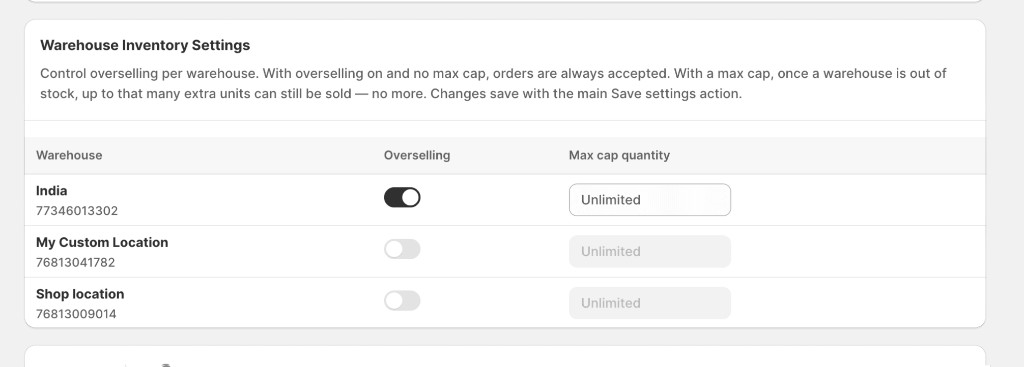
Why Warehouse ↔ Company Mapping is needed
Stores with more than one warehouse need a way to route each B2B company's orders to the correct fulfillment location without relying on staff to choose the right warehouse by hand every time.
The relationship between a warehouse and a company is not strictly one-to-one: a single warehouse can serve multiple companies, and a single company can be served by more than one warehouse depending on region, product type, or company location — similar to how a Sales Representative can be assigned to a Company or to one specific Location under that company.
Which modules use Warehouse ↔ Company Mapping?
This mapping underlies the Warehouse/location field wherever it appears across the app:
| Module | How warehouse / company context is used |
|---|---|
| Inventory | Every inventory record carries a Warehouse field. |
| Orders | Each fulfillment or shipment is tied to a warehouse/location. |
| Purchase Orders | Every PO has a required destination location that inventory is received into. |
| Sales Representatives | Company and Location assignments determine which warehouse-linked accounts a rep can manage. |
The specific admin screen used to configure Warehouse ↔ Company Mapping was not included in the source material available for this section, so the exact setup steps are not documented here yet. This page explains the concept and where it is used; add step-by-step setup instructions once that screen's details are available.