Receiving Inventory
Record stock as it arrives against an open purchase order.
In this guide:
Destination Warehouse
Every PO has exactly one destination location; all receiving against that PO credits stock to that warehouse.
Inventory Receipt Workflow
From the PO detail page, click Receive inventory to open the Receive inventory modal, which carries the note: Enter how many units to receive or reject for each product. Quantities are added to what has already been recorded.
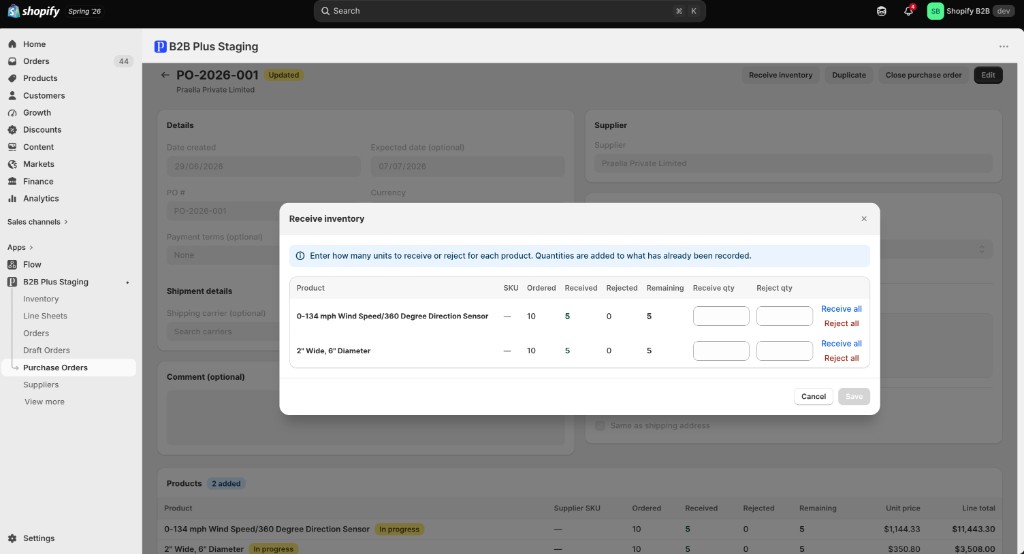
For each line that still has remaining quantity, the modal shows:
| Column | What it shows |
|---|---|
| Product / SKU | The line item and its SKU |
| Ordered | Total quantity ordered on that line |
| Received | Quantity already received in prior sessions |
| Rejected | Quantity already rejected in prior sessions |
| Remaining | Ordered minus Received minus Rejected |
| Receive qty | Quantity to accept into stock in this action |
| Reject qty | Quantity to mark as rejected/cancelled in this action |
Receive all and Reject all shortcut links sit beside each line, filling that line's Receive qty or Reject qty with its full Remaining amount in one click. Receive plus reject for a single action cannot exceed the Remaining quantity on that line, and partial receives are allowed across multiple sessions — click Save to record the action, or Cancel to discard it.
On the PO detail page, the Products table reflects this same receiving history per line — Product, Supplier SKU, Ordered, Received, Rejected, Remaining, Unit price, and Line total — with a status badge such as In progress shown next to a line that is only partially received.
An alternate full-page receiving experience exists at /receiveInventory/:id (a dedicated route gated behind the incoming inventory feature flag when enabled), for stores that prefer a dedicated receiving screen over the modal.
Finalize Purchase Order
Click Close purchase order on the detail page and confirm to set status to Closed. This is the final administrative step — use it when the PO is complete even if not every line was fully resolved through the receive flow. Once closed (or cancelled), a PO cannot be edited or received against; use Duplicate instead to start a new PO from the same data.
Inventory Synchronization
When every line on a PO is fully received or rejected, status becomes Closed automatically. Every receive action immediately updates the underlying Inventory record for that SKU and warehouse — Incoming decreases while Quantity and On-hand increase by the received amount. See Inventory Calculations.