API Credentials & Scopes
External systems—ERPs, inventory feeds, accounting software—authenticate to B2B Plus with a store-specific API key and API secret issued from Settings (Apps → B2B Plus → Settings). Scopes control which API operations each credential may perform. Grant only what each integration needs, rotate credentials periodically, and treat keys and secrets as sensitive.
In this guide:
Overview
One API key and secret pair is issued per store. These credentials authenticate every external API call the store makes into B2B Plus—inventory uploads, purchase order creation, and ERP export/sync—so they should be treated as sensitive and shared only with trusted integrations.
Scopes control which API operations a credential is allowed to perform, grouped by area. Read scopes allow an integration to view data; Write scopes allow it to create or change data.
During app installation, Shopify staff must also approve the app's requested access scopes—see App Requirements.
Recommended order
- Review API scopes (Permissions) and enable only what each integration requires.
- Generate or rotate credentials in Credentials management.
- Hand credentials to the integration owner and confirm the connection in a staging environment before go-live.
API scopes (Permissions)
The table below lists every available scope. In a typical configuration, Inventory, Orders, Invoices, Transactions, and Locations Read are enabled, while Purchase Orders and Suppliers scopes are left disabled until those integrations are needed.
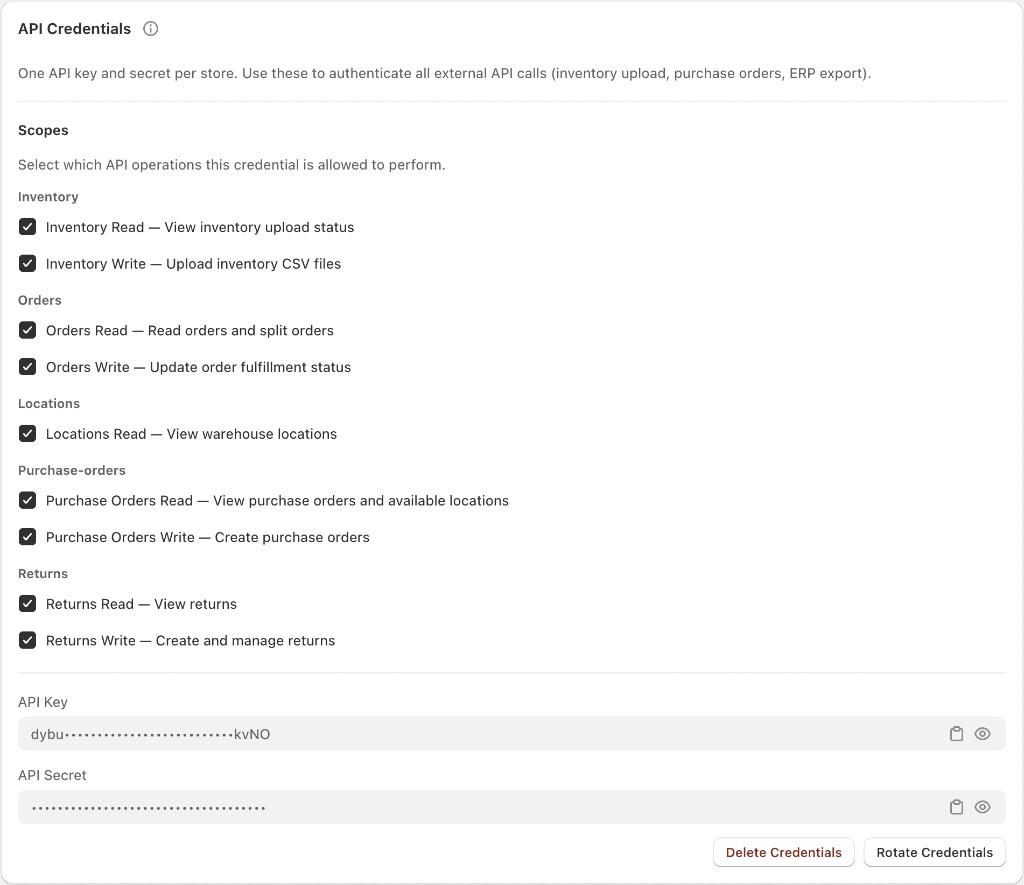
Available scopes
| Category | Scope | Grants |
|---|---|---|
| Inventory | Inventory Read | View inventory upload status |
| Inventory | Inventory Write | Upload inventory CSV files |
| Orders | Orders Read | Read orders and split orders |
| Orders | Orders Write | Update order fulfillment status |
| Invoices | Invoices Read | View invoices |
| Invoices | Invoices Write | Sync invoice URLs and upload external invoice PDFs |
| Transactions | Transactions Read | View payment transactions |
| Transactions | Transactions Write | Capture invoice payments |
| Locations | Locations Read | View warehouse locations |
| Purchase Orders | Purchase Orders Read | View purchase orders and available locations |
| Purchase Orders | Purchase Orders Write | Create purchase orders |
| Suppliers | Suppliers Read | View suppliers |
| Suppliers | Suppliers Write | Create and update suppliers and product linking |
Grant only the scopes an integration actually needs. Because Purchase Orders and Suppliers scopes are disabled by default, an ERP or procurement integration that needs to create purchase orders or manage suppliers will need those scopes turned on explicitly before it can authenticate those calls.
Credentials management
API key
A store-specific public identifier (for example, IQqqh3H8d4JUXXhzo8EbiYQGp00byTpg) used alongside the API Secret to authenticate requests. It can be copied directly from Settings.
API secret
A masked value shown as dots; it should be copied once and stored securely by the integration, since it is not intended to be visible in plain text afterward.
Token expiry
Controls how long newly issued OAuth access tokens remain valid, defaulting to 1 hour with a maximum of 24 hours. Shorter expiry improves security by limiting how long a leaked token remains usable; longer expiry reduces how often an integration needs to re-authenticate.
Delete credentials
Permanently revokes the current API key and secret, immediately blocking any integration still using them.
Rotate credentials
Issues a new API key and secret pair and invalidates the old pair. Use this periodically as a security precaution, or immediately if a credential is suspected to have been exposed.
Pair credentials with the correct API scopes before handing them to an integration owner.