Invoice Detail
Open any invoice from the list to see its full record.
In this guide:
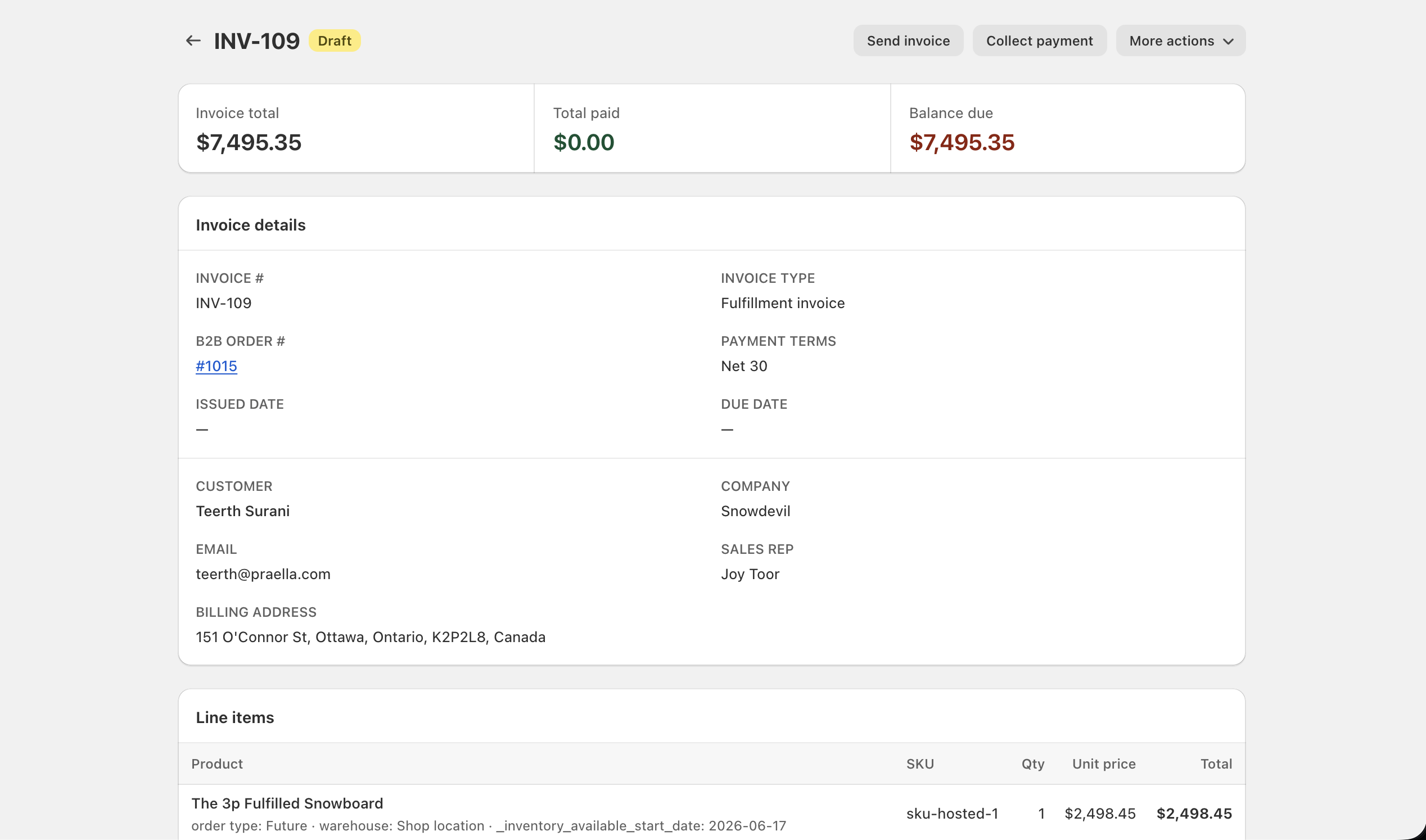
Invoice Header
- Invoice number — shown as the page title, for example INV-109.
- Status badge — sits next to the invoice number (Draft, Issued, Partial, Paid, Overdue, or Void).
- ERP synced badge — appears when an External invoice ID exists for the record, indicating it is linked to an external accounting/ERP system.
Send invoice, Collect payment, and More actions sit in the top-right of the header as the page's primary actions.
Invoice Summary
| Card | What it shows |
|---|---|
| Invoice total | Full billed amount, for example $7,495.35 |
| Total paid | Payments recorded so far, for example $0.00 |
| Balance due | Amount still owed, for example $7,495.35 |
Invoice Details
The Invoice details card includes:
| Field | Notes |
|---|---|
| Invoice type | For example, Fulfillment invoice for a shipment-scoped invoice, or a whole-order type when billed at the order level |
| Payment terms | For example, Net 30 |
| Issued date | An em dash until the invoice has actually been sent |
| Due date | Calculated from payment terms once issued; an em dash before then |
| Fulfillment reference (if any) | Present on fulfillment invoices, tying the record to a specific shipment |
| Customer and email | Buyer name and contact email, for example Teerth Surani / teerth@praella.com |
| Company and sales rep | B2B company and the rep tied to the order, for example Snowdevil / Joy Toor |
| Billing address | Full formatted billing address |
| Linked order | B2B order # as a clickable link back to order detail, for example #1015 |
Line Items
Product lines with quantity, unit price, line totals: each line shows the product, SKU, quantity, unit price, and line total, plus its inventory context (order type, warehouse, and availability dates) beneath the product name.
Subtotal, discount, shipping, tax, total: the same order-level economics shown on the order's own Payment card are reflected in the invoice's totals.
Payment History
Recorded transactions: every payment recorded against the invoice — full or partial, card or manual — is listed here with amount, method, and date.
Source tracking for payments: each entry records how the payment was captured (for example, a vaulted card charge versus a manually recorded ACH transfer), so the audit trail shows not just how much was paid but how.
Activity Timeline
Invoice activity and events — generation, sends, payments, and status changes — appear in chronological order for audit purposes, similar to the order Timeline.