Order Splitting
Order splitting breaks one Shopify order into multiple shipments (list rows) when line items differ on a configured property. Configure it once in Settings; every new order is evaluated against the current setting.
In this guide:
What is Order Splitting?
Order Splitting is the process by which B2B Plus breaks one Shopify order into multiple shipments/list rows when its line items differ on a configured property — Season, Delivery date, Start/End date, or Order type — as set up in Settings → Order Splitting by Properties.
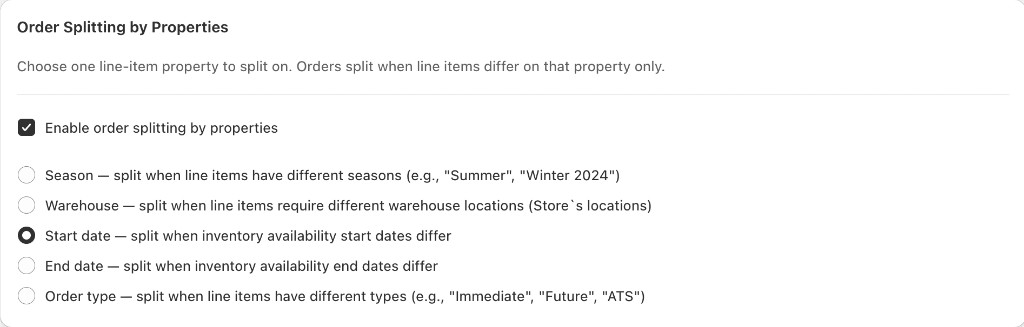
Shipments are controlled in Settings, not on the Orders page: Shopify Admin → Apps → B2B Plus → Settings, in the Order Splitting by Properties card. When shipment grouping is on, the system creates separate list rows (and separate fulfillments) for each group of line items that share the same value for the chosen property. Changing the setting does not retroactively re-split existing orders.
Properties used to form shipments (depends on your Inventory date display setting):
| Property | When multiple shipments are created |
|---|---|
| Season | Line items have different seasons (for example Summer vs. Winter 2024) |
| Delivery date | Shown when inventory uses a single available-from date; delivery/availability dates differ |
| Start date / End date | Shown when inventory uses a date range; availability window start or end differs |
| Order type | Line items have different types (for example ATS, Future, Booking) |
When shipment grouping is disabled, or all lines share the same value for the selected property, you see one row per order on the list.
Why Orders Are Split
So that stock ready to ship now, stock arriving on a future date, and pre-booked stock are fulfilled, tracked, and invoiced separately — rather than holding an entire order hostage to its slowest line.
Order Splitting Rules
Split by Delivery Window
Line items with different delivery or availability windows become separate shipments — shown when inventory uses a single available-from date.
Split by Requested Ship Date
When inventory uses a start/end date range, differing start or end dates split the order in the same way.
Product Grouping Logic
Within a shipment, line items sharing the same value for the configured split property (season, delivery date range, or order type) are grouped together. A line item with a different value forms its own shipment.
Order splitting rules are configured once per store — every new order is evaluated against the current Property to split on setting; changing the setting does not retroactively re-split existing orders.
Season-based splitting — When Season is the configured split property, line items from different seasons never share a shipment.
Delivery window logic — The exact date fields compared depend on whether Inventory Dates is configured for a single date or a start/end range.
Order Relationships
| Concept | Meaning |
|---|---|
| Shopify Order | The underlying order record in Shopify — the source of truth for payment, customer, and native fulfillment data |
| B2B Plus Orders | The B2B Plus layer's view of that same order, which may present it as a single order or as multiple shipment rows depending on the splitting configuration |
| Parent and Child Orders | The Shopify order is the parent; each shipment is a child view scoped to a subset of its line items |
Actions like Cancel order, View JSON, and ERP ID behave differently depending on whether you are acting on the parent (whole order) or a specific child shipment. See Order Details — Shipments on order detail.