Viewing Inventory
The Inventory list is the main workspace for reviewing stock. Use the sections below to understand the grid, interpret quantity columns, check status, and narrow or reorder records.
In this guide:
- Inventory List
- Inventory Information
- Inventory Status
- Search Inventory
- Filter Inventory
- Sort Inventory
Inventory List
The Inventory list displays every inventory record in a filterable, sortable table.
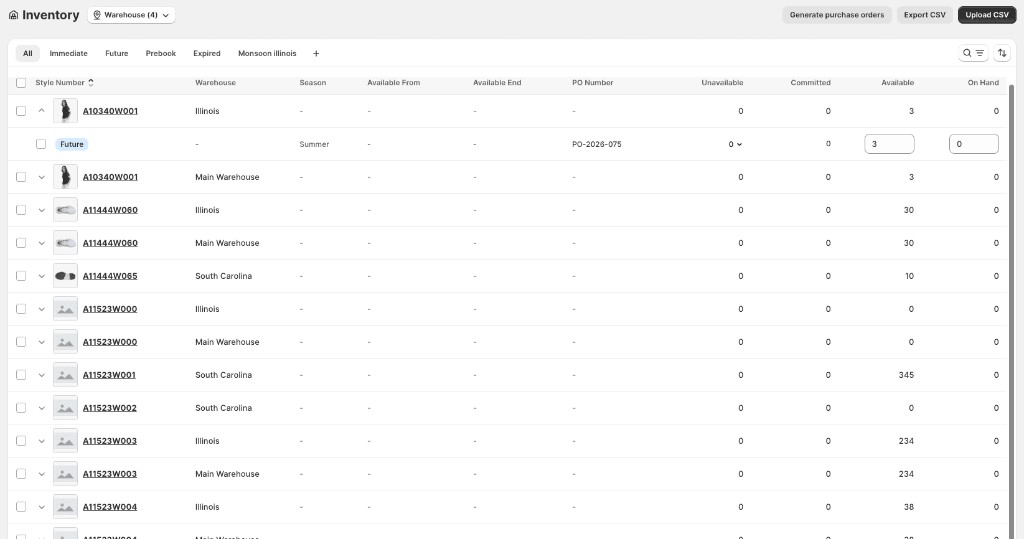
| Column | What it shows |
|---|---|
| Style/SKU | Product identifier, with image |
| Description | Product name |
| Warehouse | Location for this stock |
| Season | Inventory season (e.g., Summer, Winter, Fall, Spring) |
| Type | Inventory type (Immediate, Future, Prebook, etc.) — exposed through the page's tabs and filters rather than as its own column |
| PO # | Purchase order number |
| Quantity | Total sellable quantity |
| Committed | Reserved for orders |
| Incoming | On order |
| On-hand | Physical stock |
| Unavailable | Sum of unavailable buckets |
| Actions | Edit Available/On-hand inline (with a per-row save control), click Incoming to receive, click Unavailable to adjust, or delete |
Inventory Information
Quantity, Committed, Incoming, On-hand, and Unavailable are related but distinct figures rather than different labels for the same number — see Understanding Inventory Counts for exactly how each is defined and calculated.
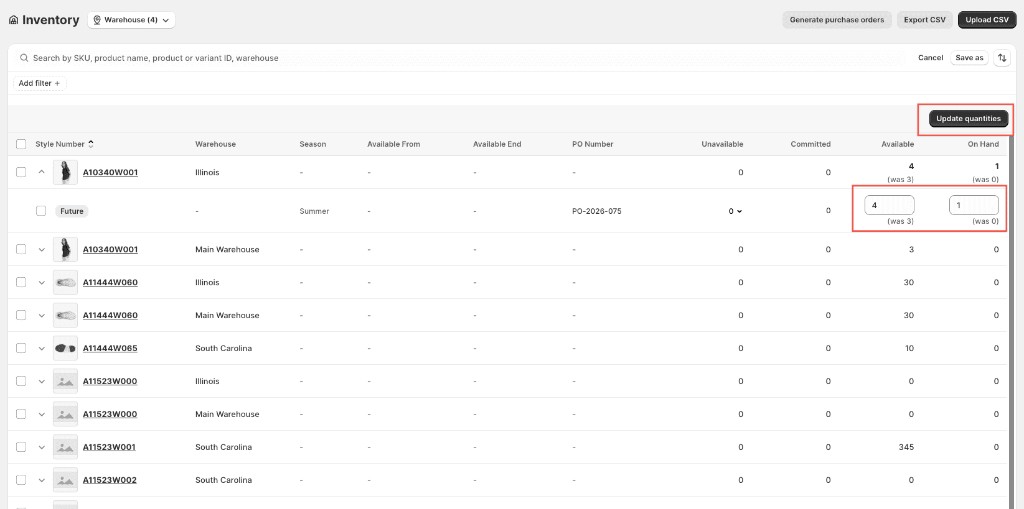
Edit Available and On Hand directly in the table using the per-row save control to commit changes to both the app and Shopify.
Inventory Status
A record's overall health is visible at a glance from its Quantity and Unavailable columns; the same underlying data drives the colored availability badges (green / yellow / red / gray) shown to buyers on the storefront Product Order Matrix. See Product Visibility.
Search Inventory
See Searching Inventory for the fields inventory can be searched by.
Filter Inventory
See Filtering Inventory for the full list of available filters.
Sort Inventory
Any column in the Inventory list can be used to sort the table, making it easy to surface the lowest-stock or soonest-expiring records first.