Understanding Inventory Counts
B2B Plus tracks several quantity columns per inventory record. Use this guide to understand what each count means and how they relate to one another.
In this guide:
Available Inventory
The Quantity figure — total sellable stock for that record, after committed and unavailable amounts are accounted for.
Quantity vs On-hand
Quantity is sellable stock; On-hand includes both sellable stock and unavailable buckets (damaged, QC, etc.). See On Hand Inventory.
On Hand Inventory
Physical stock actually present at the warehouse, including both sellable and unavailable quantities.
Committed Inventory
The portion of stock reserved against open orders and therefore no longer available to sell to a new buyer.
Unavailable Inventory
The sum of the damaged, quality-control, safety-stock, and other unavailable buckets — on-hand, but deliberately excluded from what can be sold.
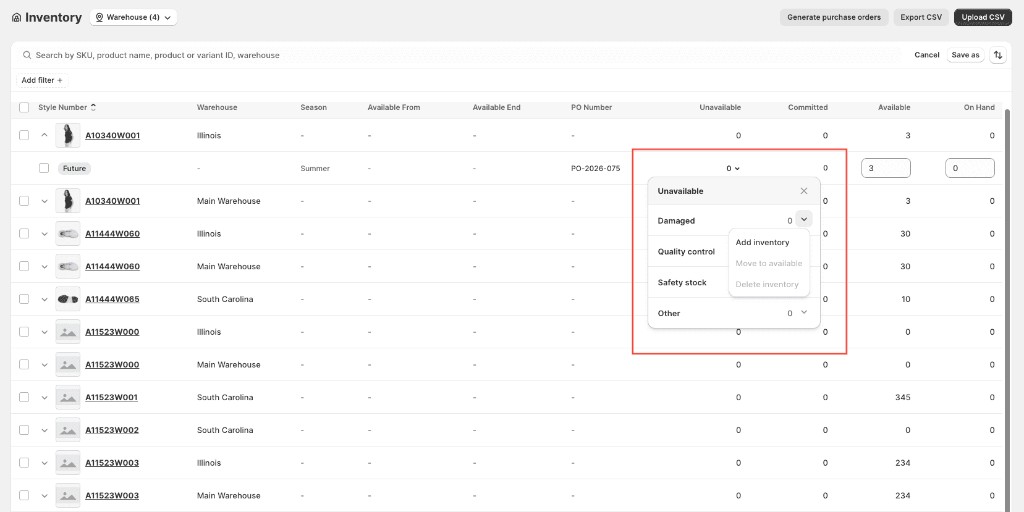
Click the Unavailable value on an inventory row to open the unavailable menu. Choose a bucket — Damaged, Quality control, Safety stock, or Other — then:
- Add inventory — move quantity into that unavailable bucket
- Move to available — return quantity to sellable stock
- Delete inventory — remove quantity from that bucket
Unavailable adjustments do not change On Hand; they reclassify stock that is already in the warehouse.